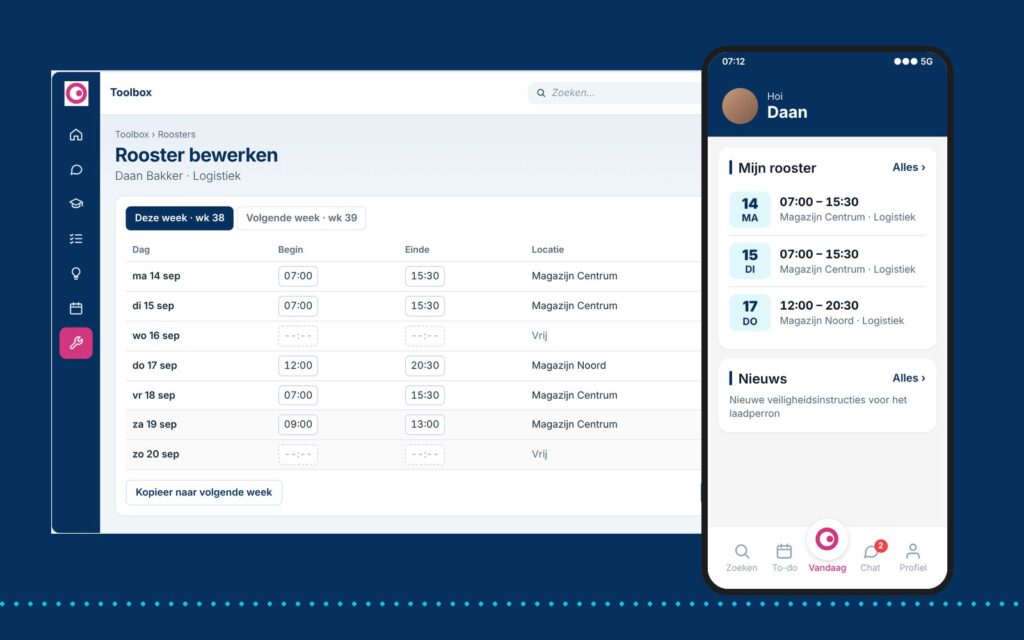
Where do I need to be tomorrow, and when? For many people in healthcare, retail and logistics, that's the first question of the day. That's why rosters have been in the KnowL app since June. The Today page shows your upcoming shifts, and one tap opens your full roster with start and end times, location and department.
Now you can create rosters too
Until now, rosters could only arrive through an integration with another system. Managers can now create and change their team members' rosters themselves in the Manager toolbox:
- Work on the current week and the next week together, in one simple view with every day, weekends included.
- Does someone work the same shifts every week? Fill in one week and copy it to the next.
- A swapped shift or a last-minute change takes a few clicks.
As soon as you save, the roster is ready for your people on the website and in the app. There's no separate publishing step, and nothing to email or print.
Even before day one
New colleagues who use the app during preboarding see their roster for the first weeks as soon as it's ready, so they know in advance where and when their first shift starts.
Prefer to deliver rosters from your own planning system? You still can, through an integration that uses an API key you manage yourself in KnowL Connect.